A lot of people think if they just invest in a beautiful website, everything will click. Better design, better layout, maybe a new color palette and suddenly the brand feels elevated.
And yes, those things matter. But there’s one piece that will quietly undo all of it if it’s not right, and it’s usually the part people overlook.
Your photos.
Because here’s the truth. You can have a well-designed, strategic, thoughtfully built website, and if you’re pairing it with DIY photos or random stock images, the whole thing starts to fall flat. Not always in an obvious way, but in a way people feel when they land on your site.
Your Website Is a Visual Experience First
Before someone reads a single word, they’re scanning. They’re taking in your imagery and making quick decisions about your brand. Does this feel established? Does this feel elevated? Do I trust this?
That impression is happening in seconds, and your photos are leading it.
So even if your website is built well behind the scenes, if the visuals don’t support it, it won’t land the way it’s supposed to. This is where I see a lot of people get stuck. They invest in the design, but the imagery doesn’t match the level they’re trying to reach.
What DIY and Stock Photos Actually Do
Let’s just be honest about it. DIY photos tend to feel inconsistent, whether it’s lighting, color, or overall quality. They’re not bad, they just don’t fully support a polished brand. Stock photos have a different issue. They’re clean, but they’re generic. They don’t reflect your business, your personality, or your actual experience.
When you layer either of those into a custom website, it creates a disconnect. The design might be strong, but the experience doesn’t feel cohesive. It feels pieced together, and that’s when your site starts to feel lower quality than it actually is.
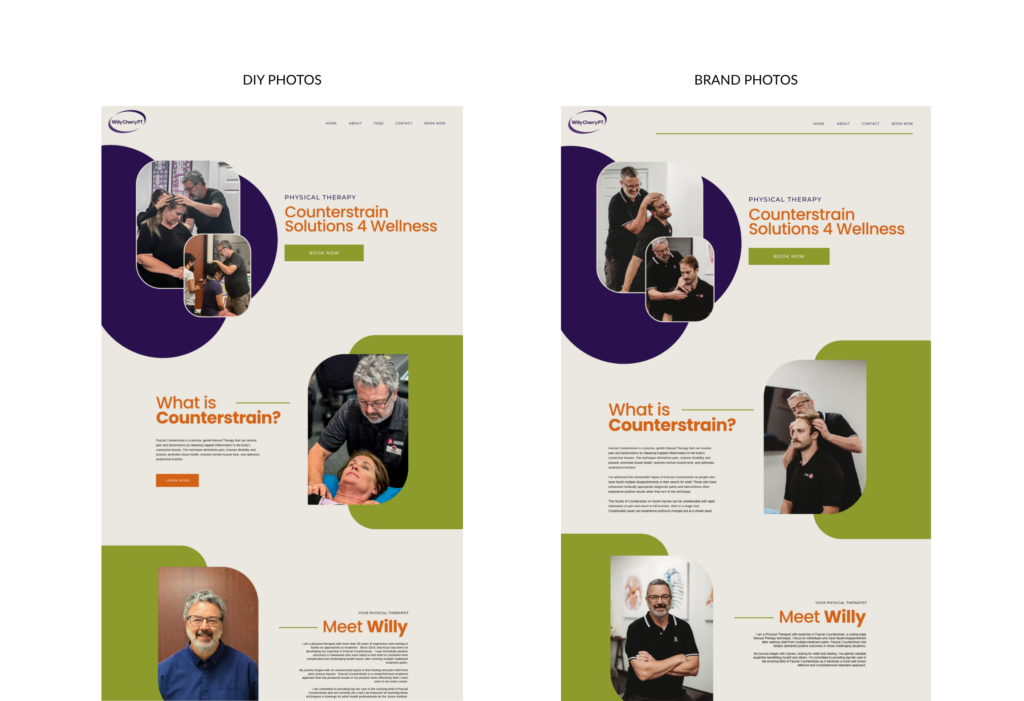
This Is Where Things Start to Break Down
When your visuals and your design aren’t aligned, your website can feel a little off. It’s harder to trust, it doesn’t feel as elevated, and people don’t always know why. From your side, this usually shows up as fewer inquiries, slower conversions, or constantly tweaking things without seeing real improvement.
Most of the time, it’s not the layout. It’s not even the copy. It’s the photos.
What It Looks Like When It’s Aligned
When your brand photography actually supports your website, everything starts to feel easier. The site feels cohesive, your brand feels clear, and the experience feels intentional from the first scroll.
You’re not trying to convince someone you’re the right fit. It already feels that way. People stay longer, they click through, and they reach out because the brand experience feels consistent and put together.
Why This Matters More Than People Think
This is also why I don’t treat photography and website design as two separate things. Your photos aren’t something you add in at the end, they shape the entire direction of your site. They influence your layout, your color palette, the way your content flows, and how your brand is experienced overall.
When the visuals are strong, the design process becomes more intentional. When they’re not, you end up trying to make things work around images that don’t fully support the brand.
If Your Website Feels Off, Start Here
Before you assume you need a full redesign, take a step back and look at your visuals. Do they actually reflect the level you want your brand to be at? Do they feel cohesive across your site? Are they supporting your positioning, or just filling space?
Because a lot of the time, the issue isn’t starting over. It’s bringing your photos up to the level your brand is already at.
Final Thoughts
A beautiful website can’t carry weak visuals, but strong brand photography can elevate everything around it. When your photos and your design are aligned, your brand feels clearer, more elevated, and easier to trust.
And that’s usually when your website starts to actually work.
Ready to Elevate Your Website and Photos?
If you’re ready for a website that feels aligned and photos that actually support it, I’ll guide you through both so everything works together from the start. Get started here →